Repo Primer for Zephyr microPlatform
This section describes Repo and how the Zephyr microPlatform uses it. If you’re unfamiliar with Repo, it may make things clearer.
A Zephyr microPlatform installation contains multiple Git repositories, which are managed by a manifest file in a Repo manifest repository.
The manifest repository’s name is zmp-manifest. It’s a Git
repository, just like any of the source code repositories. When
installing the Zephyr microPlatform, repo
init is given the URL for the manifest repository (either a
subscriber or public version).
The manifest repository contains a manifest file, named
default.xml. This file describes the other Git repositories in
the Zephyr microPlatform installation, and their metadata. During
installation, repo sync is run after repo init. This clones the
other repositories according to the contents of the manifest.
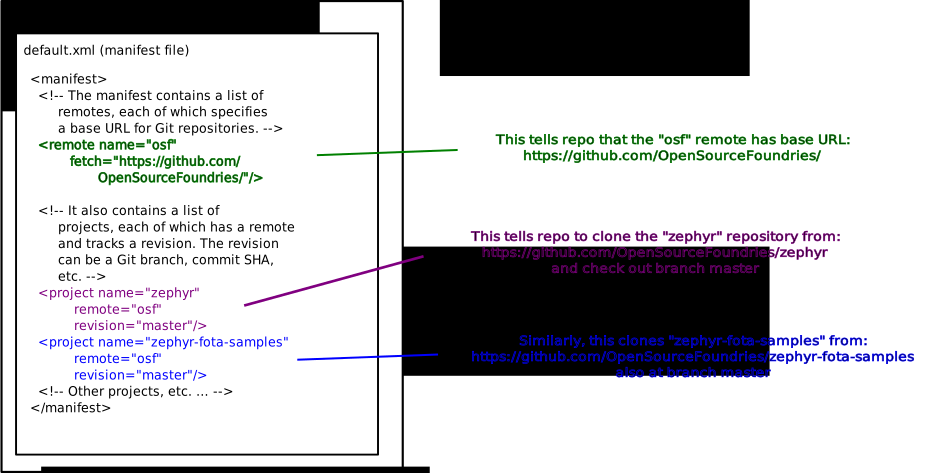
Roughly speaking, the manifest file contains:
- remotes, which specify where Zephyr microPlatform repositories are hosted.
- projects, which specify the Git repositories that make up the microPlatform, along with the remotes to fetch them from, and Git branches to check out.
The following figure ties together the various pieces.